Generating an AWS MAP Funding Request
Tidal Accelerator can step you through assembling an AWS Migration Acceleration Program (MAP) funding request by combining inventory data gathered in your workspace with an AWS Pricing Calculator estimate.
What is a MAP funding request, and why generate one?
The AWS Migration Acceleration Program (MAP) is AWS’s program for supporting customers who are migrating and modernizing workloads on AWS. A MAP funding request is the structured summary of your assessed scope - your applications, servers, workload profiles, and projected AWS costs - that AWS and delivery partners use to qualify an engagement and align it to MAP.
Typically you generate a funding request after you have assessed your estate in Accelerator (for example, following an Application Modernization Assessment, or AMA). Once you understand what you have and what it will cost on AWS, the funding request packages that evidence so you can pursue support for the next phases of your migration and modernization journey, rather than reconstructing the business case by hand.
In short:
- When: after you have grouped your migration scope into a project and have a cost estimate, when you want to move from assessment into a funded migration or modernization phase.
- Why: to produce a consistent, AWS-ready summary of your scope and projected costs that supports qualifying the work for MAP.
- What you get: a JSON file conforming to the AWS funding request schema, ready to share with your AWS team or delivery partner.
Eligibility, funding amounts, and program terms are determined by AWS and your AWS contacts. This guide covers how to produce the funding request data in Accelerator; it does not determine or promise funding.
Before you begin
Before generating a funding request, ensure your project has the required data:
- In-scope applications and servers: Group your migration scope into a project. If you have not done this yet, see the Projects guide.
- Project start date: Set an initial date for the project under the ‘Overview’ tab. Accelerator uses this as the assessment initial date.
- AWS Calculator URL: Save a shareable AWS Pricing Calculator estimate link to the project. Several pricing metrics and service lines are derived from this estimate.
- Workload profiles: Generate and review them on the project’s ‘Workload Profiles’ tab first. A workload profile is a summary of a group of similar workloads in your scope - the type of workload (such as VMware, databases, or Windows servers), the migration strategy you intend to apply (one of the AWS 7Rs, such as rehost or replatform), and the AWS service you plan to move it to. AWS uses these profiles to understand the shape of your estate, so a funding request includes them.
The ‘MAP Funding Request’ button remains disabled until an AWS Calculator link is saved to the project. To add the link, navigate to the ‘Overview’ tab of your project, scroll to the ‘MAP Funding Request’ card, click ‘Edit’, paste your estimate link into ‘AWS Calculator URL’, and click ‘Save’.
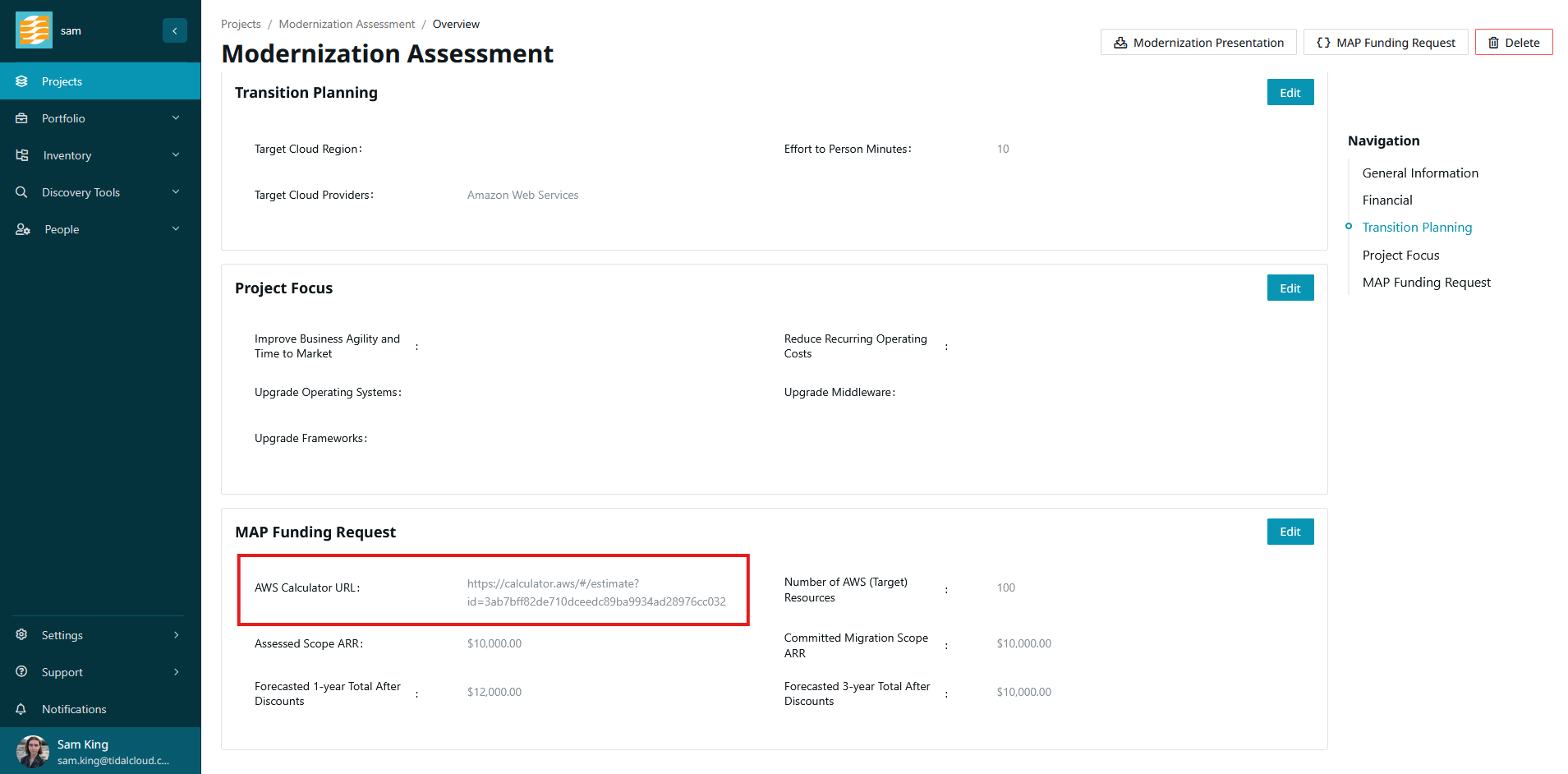
Opening the MAP Funding Request
-
Navigate to the project you want to generate the request for.
-
Click the ‘MAP Funding Request’ button.
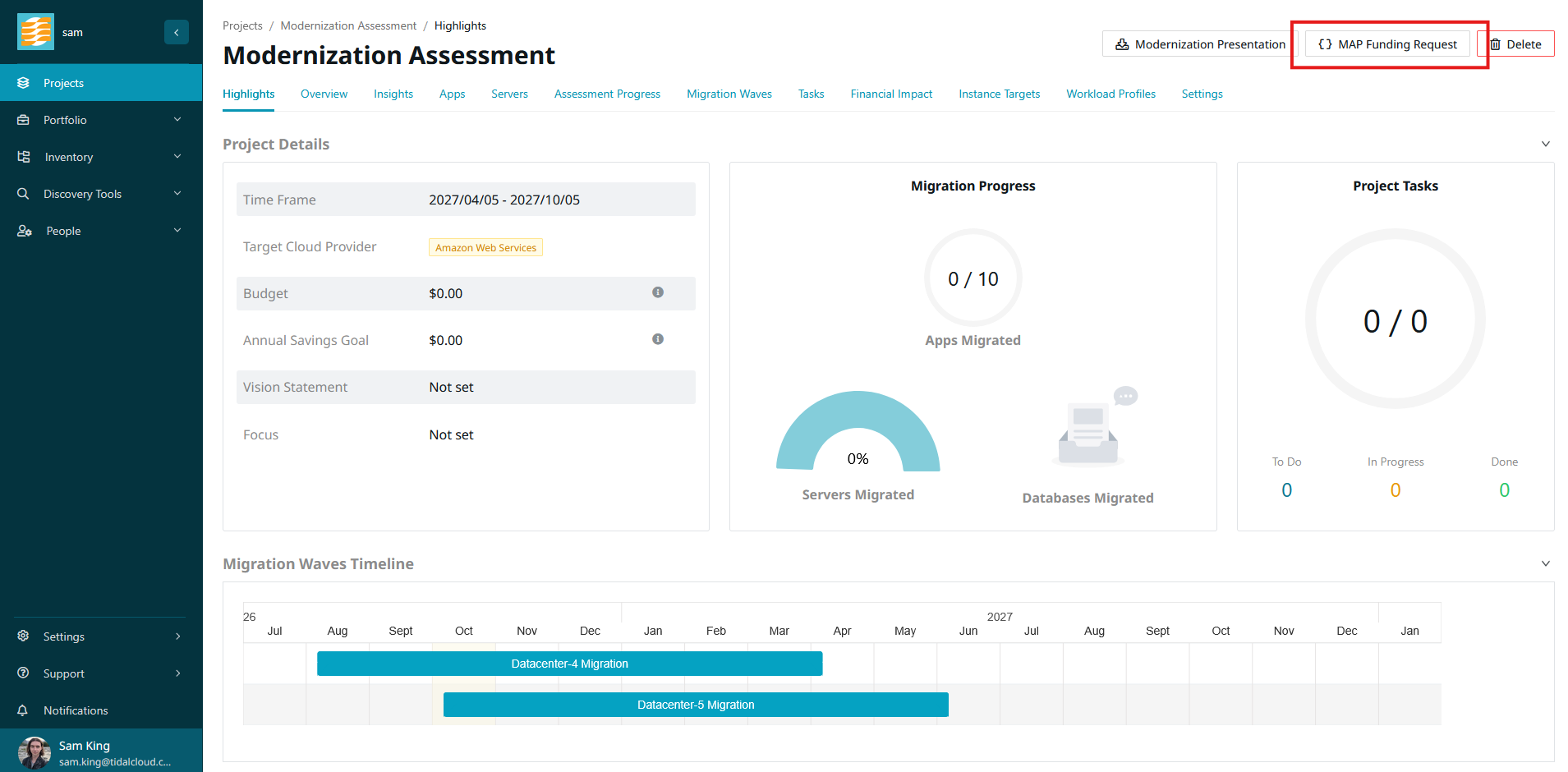
Accelerator fetches the funding request data for the project and displays it in a validation modal. Several values are derived from your saved AWS Calculator link and inventory, so review each section carefully to ensure the figures match expectations.
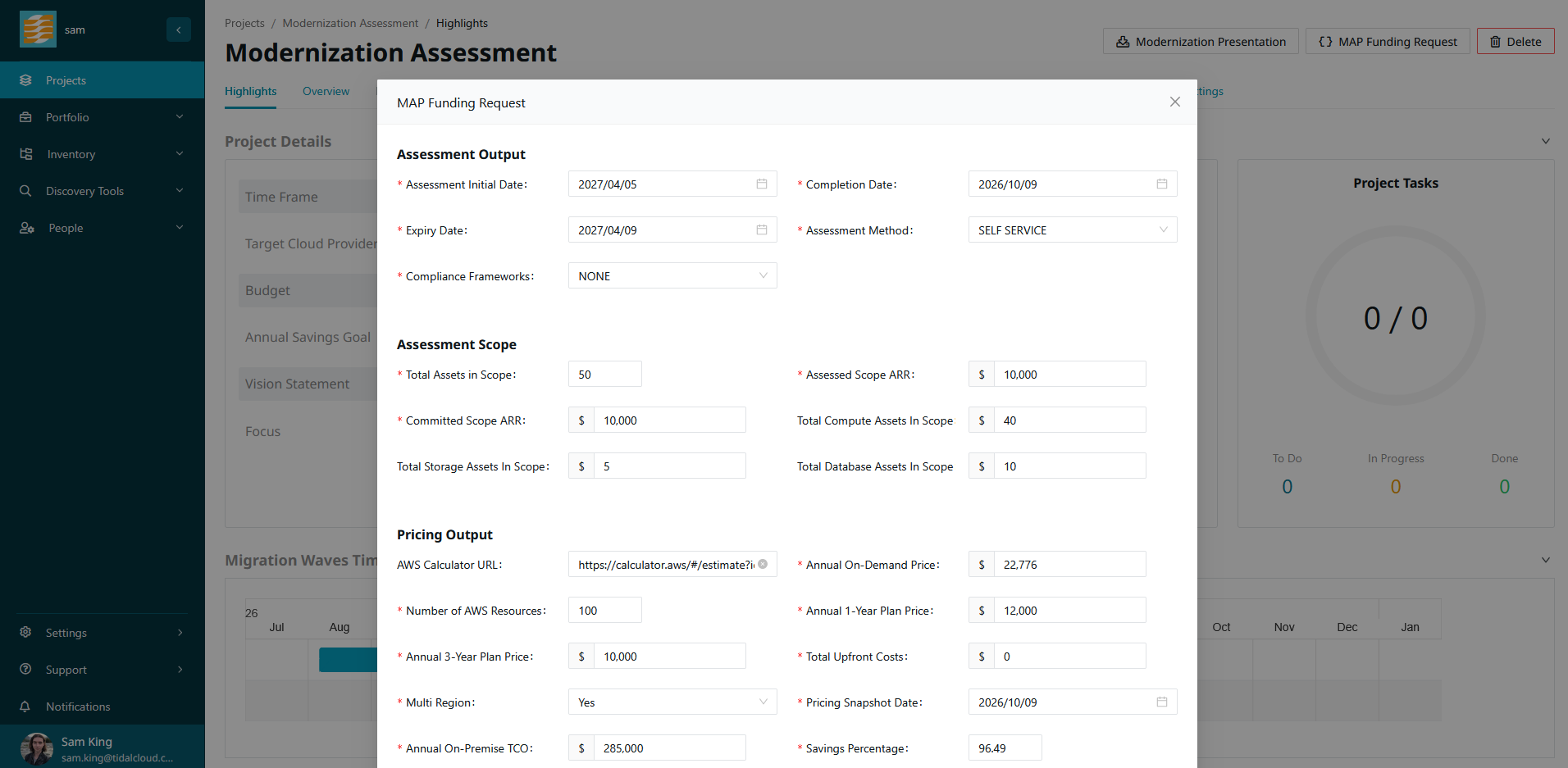
Reviewing and editing the data
The modal displays all fields included in the AWS funding request JSON, grouped into sections:
- Assessment Output: Engagement metadata, including the assessment initial date, completion date, six-month expiry date, assessment method (‘SELF SERVICE’), and applicable compliance frameworks.
- Assessment Scope: Scope metrics across the estate, including total assets in scope, compute servers, storage volume (in whole terabytes), database instances, Assessed Scope ARR, and Committed Migration Scope ARR.
- Pricing Output: Cloud cost forecasts and financial comparisons derived from your AWS Calculator estimate, including annual on-demand pricing, 1-year and 3-year discounted plans, upfront costs, on-premises annual TCO, and estimated savings percentage.
- Services: Line items for each AWS service in your pricing estimate (such as EC2 instances and EBS volumes). You can edit row values, delete rows with ‘Remove’, or add new lines with ‘+ Add row’.
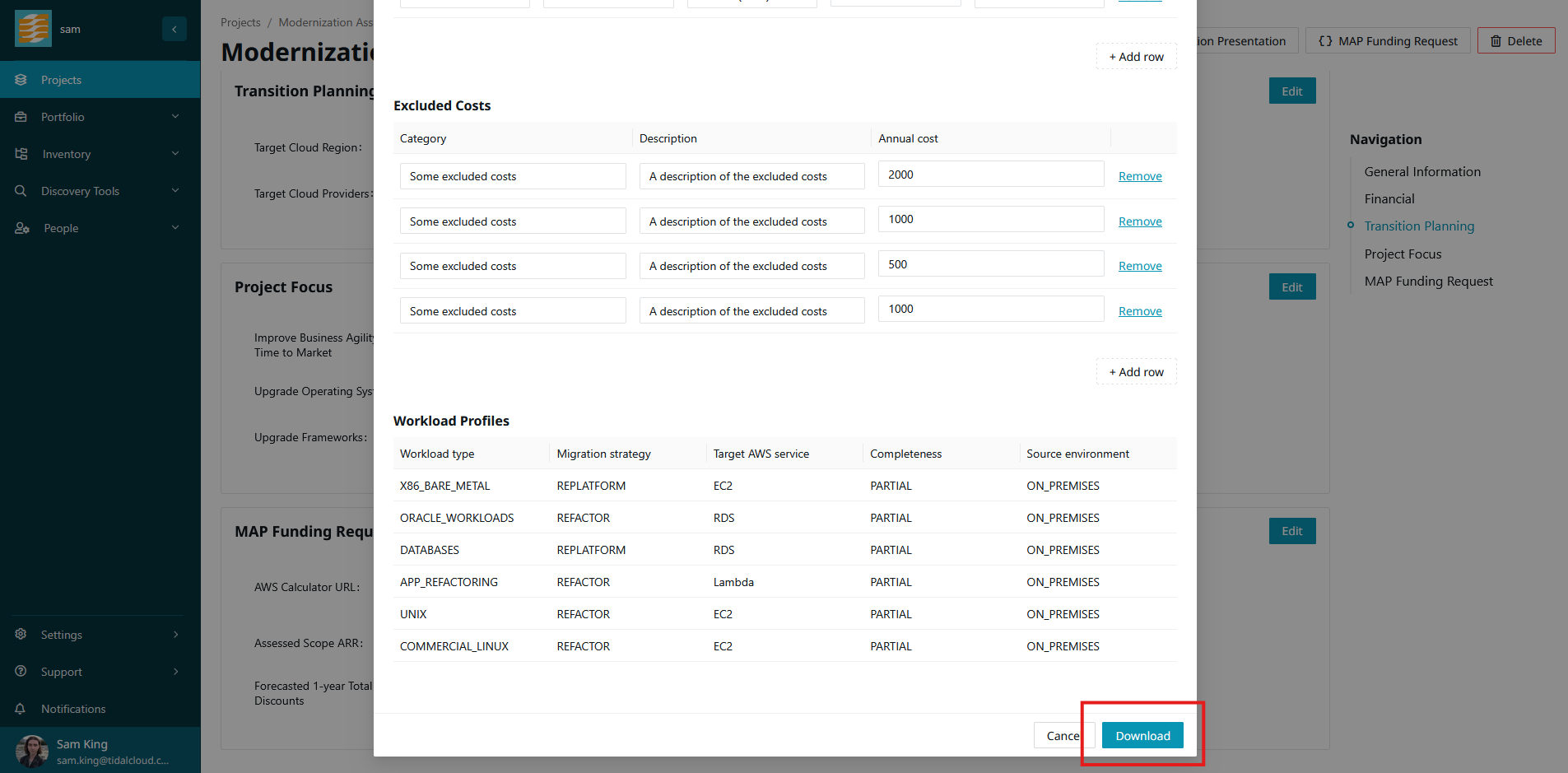
- Excluded Costs: Optional costs excluded from cloud pricing (such as retained systems or third-party licensing). You can add rows with ‘+ Add row’ or delete rows with ‘Remove’.
- Workload Profiles: A summary of assessed workload types, migration strategies, and target AWS services (see Before you begin for what a workload profile is). These rows are read-only in this modal; to make changes, update your profiles on the project’s ‘Workload Profiles’ tab before opening the request.
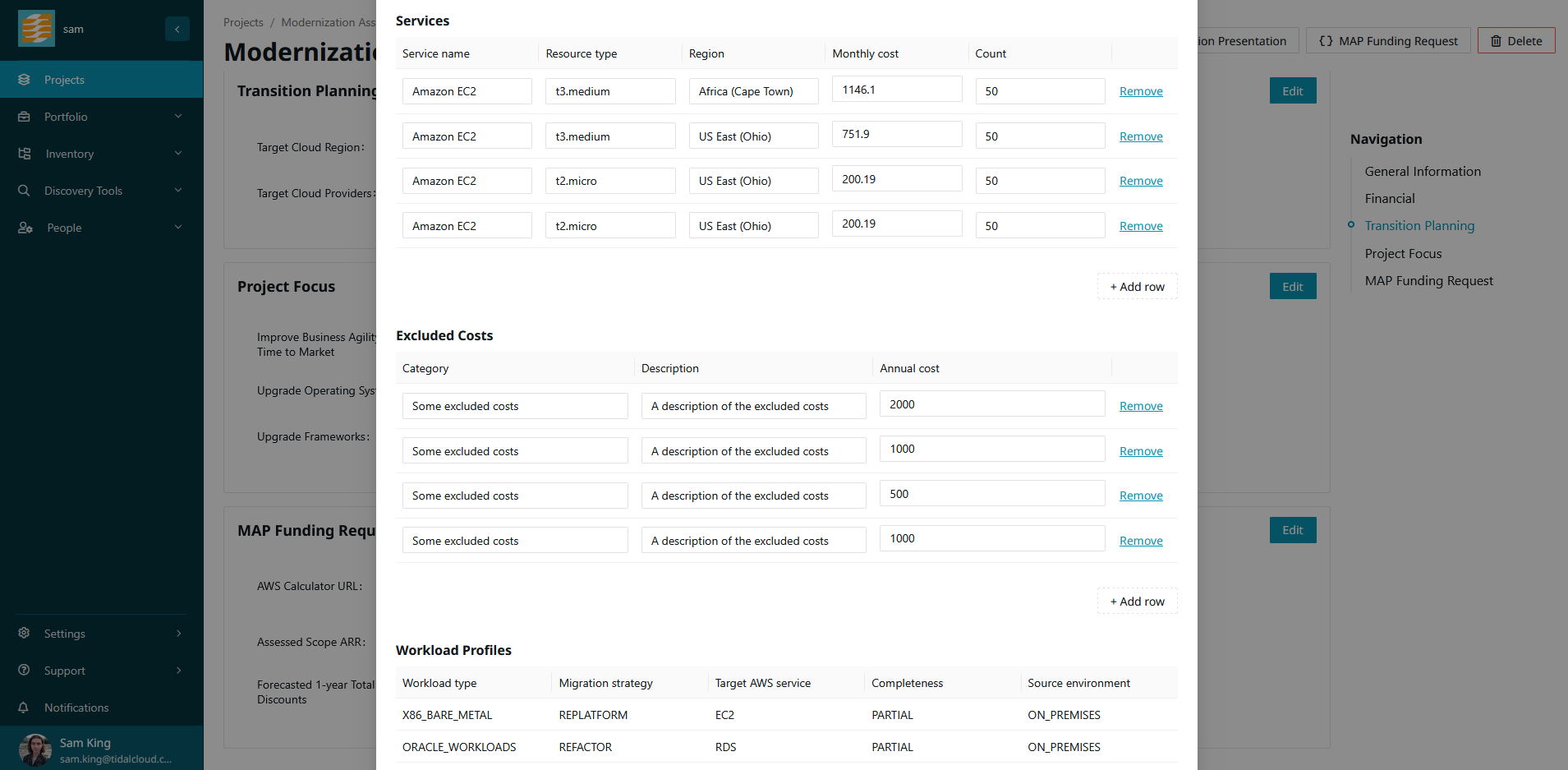
Edits made in this modal apply to the downloaded file only. They do not alter the underlying project, application, or server records in Tidal Accelerator.
Downloading the JSON
When you are satisfied with the data, click ‘Download’ to save the request as a JSON file.
The downloaded file adheres to the AWS AssessmentOutput v2 schema and is ready
for submission to AWS (such as uploading to AWS Transform / ATX) for MAP deal
qualification.
Next steps
Share the downloaded funding request with your AWS team or delivery partner to support qualifying the engagement for MAP and planning the next phases of your migration and modernization. Your AWS contacts determine eligibility and any funding; this file provides the assessed scope and projected costs they need to have that conversation.
Where the data comes from
The table below outlines how Tidal Accelerator populates each field in the
AssessmentOutput v2 funding request schema:
| Field | Description | Source |
|---|---|---|
assessment_output.compliance_frameworks |
Compliance frameworks in scope, or NONE | Project compliance frameworks, comma-joined; "NONE" when empty |
assessment_output.assessment_method |
How the assessment was conducted | Constant "SELF_SERVICE" |
assessment_output.output_status |
Status of this assessment output | Constant "FINAL" |
assessment_output.assessment_version |
Report version | Constant "1" |
assessment_output.is_current |
Whether this is the active output | Constant true, emitted as "Yes" |
assessment_output.assessment_initial_date |
Date the assessment started | Project start date (start_date) |
assessment_output.assessment_completion_date |
Date the assessment completed | Generation date |
assessment_output.assessment_expiry_date |
Completion date plus six months | Generation date + 6 months |
assessment_output.assessor_org |
Organization that performed the assessment | Client organization name |
workload_profiles[].workload_type |
Category of workload assessed | Workload classification rules |
workload_profiles[].migration_strategy |
Dominant 7R strategy for the workload | Most-voted strategy across candidate records |
workload_profiles[].target_aws_service |
Primary AWS migration target | Most-voted target within the winning strategy |
workload_profiles[].primary_assessment_tool |
Tool that produced the assessment | Constant "Tidal Accelerator" |
workload_profiles[].source_environment |
Where the workload runs now | Constant "ON_PREMISES" |
workload_profiles[].source_platform_detail |
Source OS and platform breakdown | Distinct OS names and versions of the workload type’s servers, or "Unknown" |
workload_profiles[].assessment_completeness |
How complete the assessment is | Chosen by the user when generating workload profiles |
workload_profiles[].tool_version |
Version of the assessment tool | Current Tidal Accelerator release version |
assessment_scope.scope_type |
Scope type (full or partial) | Constant "FULL" |
assessment_scope.total_assets_in_scope |
Count of in-scope assets | Sum of compute servers and database instances |
assessment_scope.scope_agreed_with_customer |
Scope agreed with the customer | Constant true, emitted as "Yes" |
assessment_scope.assessed_scope_arr |
Customer ARR for the assessed scope | ‘Assessed Scope ARR’ from ‘MAP Funding Request’ section of the project overview (default 0) |
assessment_scope.committed_migration_scope_arr |
ARR the customer committed to migrate | ‘Committed Migration Scope ARR’ from ‘MAP Funding Request’ section of the project overview (default 0) |
assessment_scope.total_compute_assets_in_scope |
Count of in-scope compute assets | Count of servers in the project |
assessment_scope.total_storage_assets_in_scope |
Count of in-scope storage assets | Sum of allocated server storage in GB divided by 1024, rounded to whole TB |
assessment_scope.total_databases_assets_in_scope |
Count of in-scope database assets | Count of database instances linked to the project’s applications and servers |
partial_scope_components[].component_type |
Type of scope component | Not populated; scope_type is always "FULL" |
pricing_output.on_demand_annual |
Annual on-demand cost | Calculator monthly total multiplied by 12 |
pricing_output.estimated_1yr_total_after_discounts |
Annual cost under a 1-year commitment | ‘Forecasted 1-year Total After Discounts’ from ‘MAP Funding Request’ section of the project overview (default 0) |
pricing_output.estimated_3yr_total_after_discounts |
Annual cost under a 3-year commitment | ‘Forecasted 3-year Total After Discounts’ from ‘MAP Funding Request’ section of the project overview (default 0) |
pricing_output.tco_on_premises_annual |
On-premises annual TCO | Sum of current annual on-premises costs across project applications |
pricing_output.tco_savings_percentage |
TCO savings percentage (0 to 100) | total_savings divided by tco_on_premises_annual multiplied by 100, rounded to 2 decimal places (0 with no baseline) |
pricing_output.total_aws_resources |
Total in-scope AWS resources | ‘Number of AWS (Target) Resources’ from ‘MAP Funding Request’ section of the project overview (default 0) |
pricing_output.calculator_estimate_url |
AWS Pricing Calculator estimate URL | ‘AWS Calculator URL’ from ‘MAP Funding Request’ section of the project overview |
pricing_output.pricing_snapshot_date |
Date the pricing estimate was generated | Creation timestamp (createdOn) from the calculator estimate |
pricing_output.multi_region |
Whether pricing covers multiple regions | true if calculator services span more than one region; otherwise false |
pricing_output.currency |
Currency code for all monetary values | Constant "USD" |
pricing_output.total_upfront_costs |
One-time upfront costs across all services | Total upfront cost from the calculator estimate |
pricing_output.total_savings |
Savings subtracted from Qualified ARR | tco_on_premises_annual minus estimated_3yr_total_after_discounts, clamped at 0 |
pricing_output.services[].service_name |
Service identity from calculator | Service name from the calculator estimate |
pricing_output.services[].resource_type |
Instance family, bundle, or instance type | Calculator component instance type |
pricing_output.services[].region |
AWS region for this service line | Calculator region name |
pricing_output.services[].effective_monthly_cost |
Amortized monthly cost | Calculator monthly service cost |
pricing_output.services[].resource_count |
Number of resources for this line | Calculator component workload count |
pricing_output.excluded_costs[].category |
Exclusion category identifier | Not populated from inventory; can be added in the modal |
pricing_output.excluded_costs[].description |
What is excluded and why | Not populated from inventory; can be added in the modal |
pricing_output.excluded_costs[].annual_cost |
Annual excluded cost | Not populated from inventory; can be added in the modal |
assessment_artifacts[].artifact_id |
Identifier of the assessment artifact | Populated automatically based on the project name |
assessment_artifacts[].artifact_category |
Category of the artifact | Constant ASSESSMENT |
assessment_artifacts[].artifact_version |
Version of the artifact | Current timestamp |